Thermal Paste Required
My Fan Was Getting Noisy
And I mean really noisy. All the time. My fans were on full blast just using DOSBox. That shouldn't be happening on a 12th generation i5U.
What did lm-sensors have to say about it? 95°C and not dropping, even on low, low load.
Sounds like a thermal paste problem.
Thermal paste doesn't last forever. I've never personally had to replace it (except maybe for one old laptop that would sometimes thermally shut down randomly, but that was long ago, before I knew what I was doing). But thermal paste does go bad eventually.
As it just so happened, I had some on hand (so that one day I could re-paste the aforementioned laptop and see if that solved the issue).
I went ahead and removed the fan screws and was greeted with some very dry, not healthy looking thermal paste. Looks like I'm on the right track.
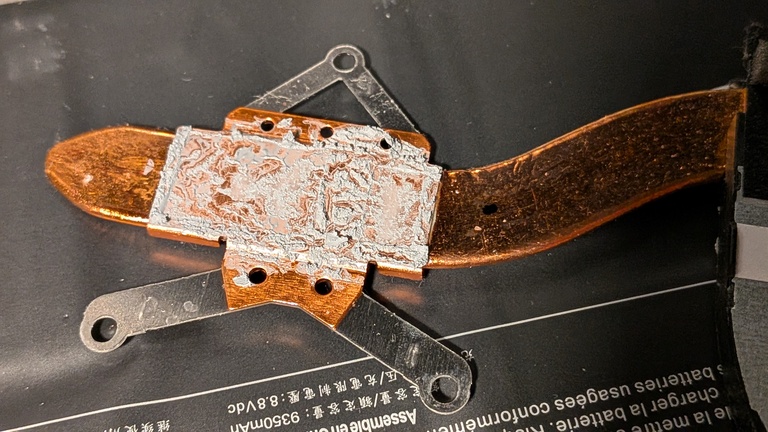
I cleaned the old paste off with some cotton swabs and isopropyl alcohol: the wonder solvent of the electronics world. Ooo, shiny!
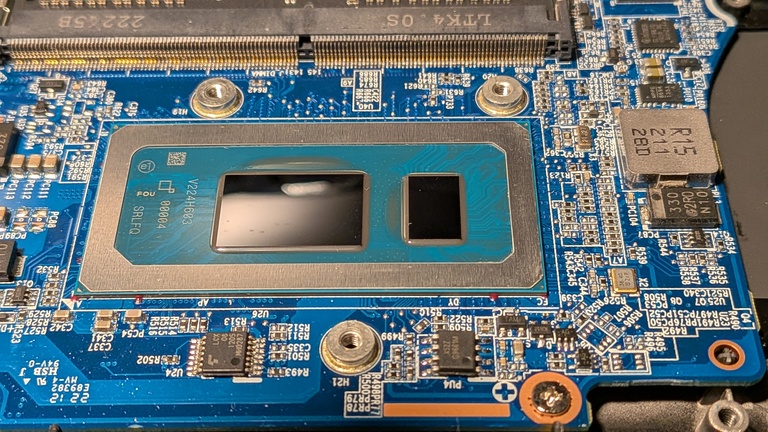
I also looked at the heatsink in the fan assembly to see if it needed new thermal paste too. But as best as I could tell, that sucker was soldered together.
I had an idea of how much thermal paste to put on, but didn't really know, you know? I figured it was better to err on the side of abundance. In the end, I'm pretty sure I used way too much. 😉
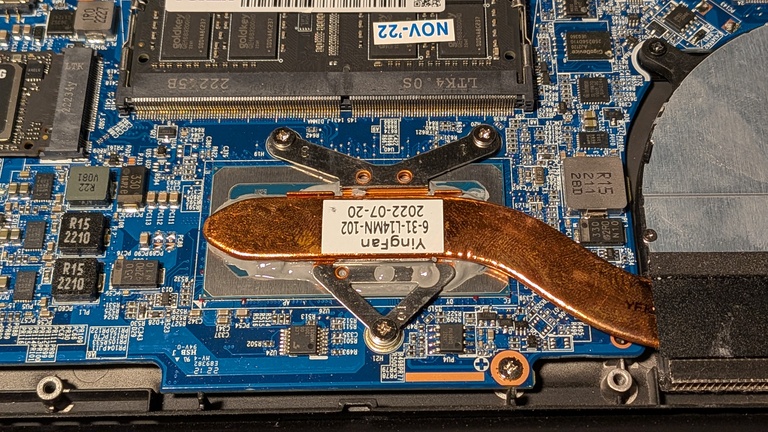
I thought about if I should clean up the excess. I don't think it would affect the thermals either way by much, cause the whole point of this is to create a good conductive filler. So what if it grabbed heat from a wider base on the chip and funneled heat up to the sides of the heat pipe?
But then I thought about how dry and crumbly the old thermal paste had gotten and decided we didn't want that rolling around in my laptop's chassis in a few years. So I tried my best to clean it up, but I kind of wish I hadn't now, because it looks way uglier. (Photo not shown for vanity reasons.)
I could have used some more IPA to clean up the smears, but I didn't want to risk dissolving any of the paste I needed and diminishing the integrity of the thermal bond. I don't know if that's really a thing, but I decided that was good enough for today. After all, "Perfect is the enemy of good enough."
Results
Do I have results? Oh baby, do I! Look at these sweet thermals:
$ sensors
coretemp-isa-0000
Adapter: ISA adapter
Package id 0:  +44.0°C  (high = +100.0°C, crit = +100.0°C)
Core 0:        +43.0°C  (high = +100.0°C, crit = +100.0°C)
Core 4:        +41.0°C  (high = +100.0°C, crit = +100.0°C)
Core 8:        +41.0°C  (high = +100.0°C, crit = +100.0°C)
Core 9:        +41.0°C  (high = +100.0°C, crit = +100.0°C)
Core 10:       +41.0°C  (high = +100.0°C, crit = +100.0°C)
Core 11:       +41.0°C  (high = +100.0°C, crit = +100.0°C)
Core 12:       +42.0°C  (high = +100.0°C, crit = +100.0°C)
Core 13:       +41.0°C  (high = +100.0°C, crit = +100.0°C)
Core 14:       +41.0°C  (high = +100.0°C, crit = +100.0°C)
Core 15:       +41.0°C  (high = +100.0°C, crit = +100.0°C)

system76_acpi-acpi-0
Adapter: ACPI interface
CPU fan:        0 RPM
CPU temp:     +47.0°C

iwlwifi_1-virtual-0
Adapter: Virtual device
temp1:        +30.0°C

nvme-pci-0100
Adapter: PCI adapter
Composite:    +40.9°C  (low  = -273.1°C, high = +81.8°C)
                       (crit = +84.8°C)
Sensor 1:     +40.9°C  (low  = -273.1°C, high = +65261.8°C)
Sensor 2:     +51.9°C  (low  = -273.1°C, high = +65261.8°C)

BAT0-acpi-0
Adapter: ACPI interface
in0:           8.36 V
curr1:         1.03 A
```